Pay your people. Approve from your phone.
Pay staff and suppliers in one batch, with a second pair of eyes on the big ones, a team where everyone has their own role, and an API for your own systems.
Pre-launch. Business accounts open when tazdan launches in Libya.
Paying people shouldn’t be a day’s work.
For most small businesses in Libya, payday still means cash, queues and a notebook. Here’s what changes.
Payday means a cash run, a bank queue and a stack of envelopes.
Pay up to 500 people in one batch, straight into their tazdan wallets.
Suppliers wait while you transfer them one at a time.
Every line is checked before you send, then everyone is paid in the same run.
Big payments leave the account with nobody checking them.
Above your threshold, a second owner or admin approves — never the person who made the batch.
Everyone shares one login, so nobody knows who did what.
Each person gets their own role, and every change they make is recorded against their name.
Every payment is typed in by hand, because there’s no API to automate it.
Scoped API keys let your payroll or accounting system send payouts and hear back by signed webhook.
Month end is a spreadsheet, matched line by line against a statement.
Every payout has its own reference, status and fee — filterable in the app and over the API.
From verified to payday.
The business side of the tazdan app, one screen at a time.
Verified once, properly.
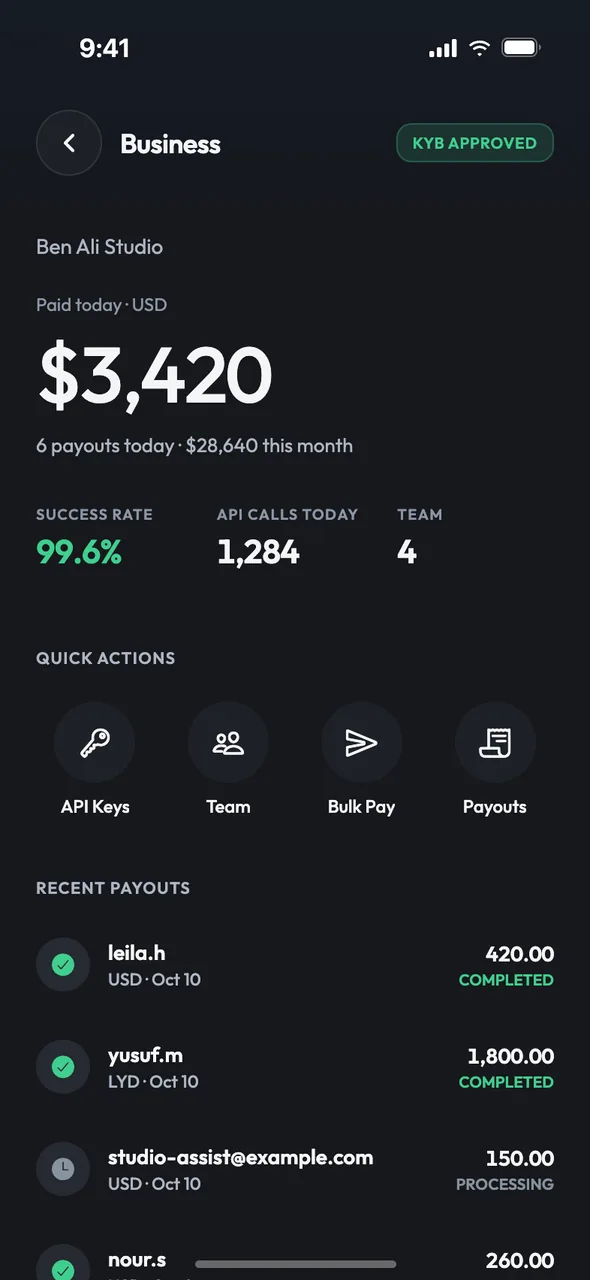
Payouts stay locked until your business is verified. The owner submits it from the app, our compliance team reviews your company documents, and you’re told the outcome — with the reason, if something needs fixing.
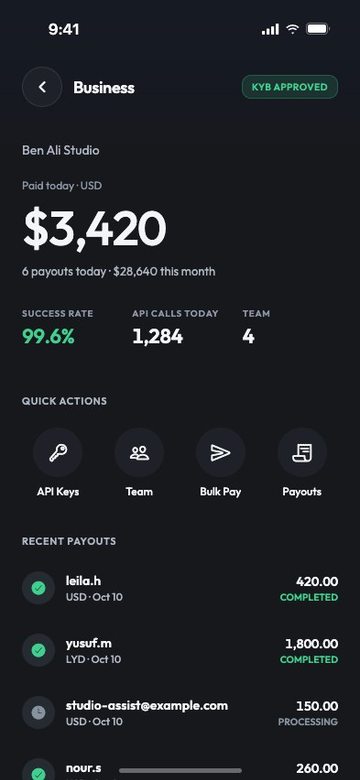
- Your verification status is always on the business home: not submitted, under review, approved or not approved.
- If it isn’t approved, fix the issue and resubmit from the app.
- Your business and every person you pay are screened against sanctions lists before any money moves.
“Our accountant uses my login. So does my brother.”
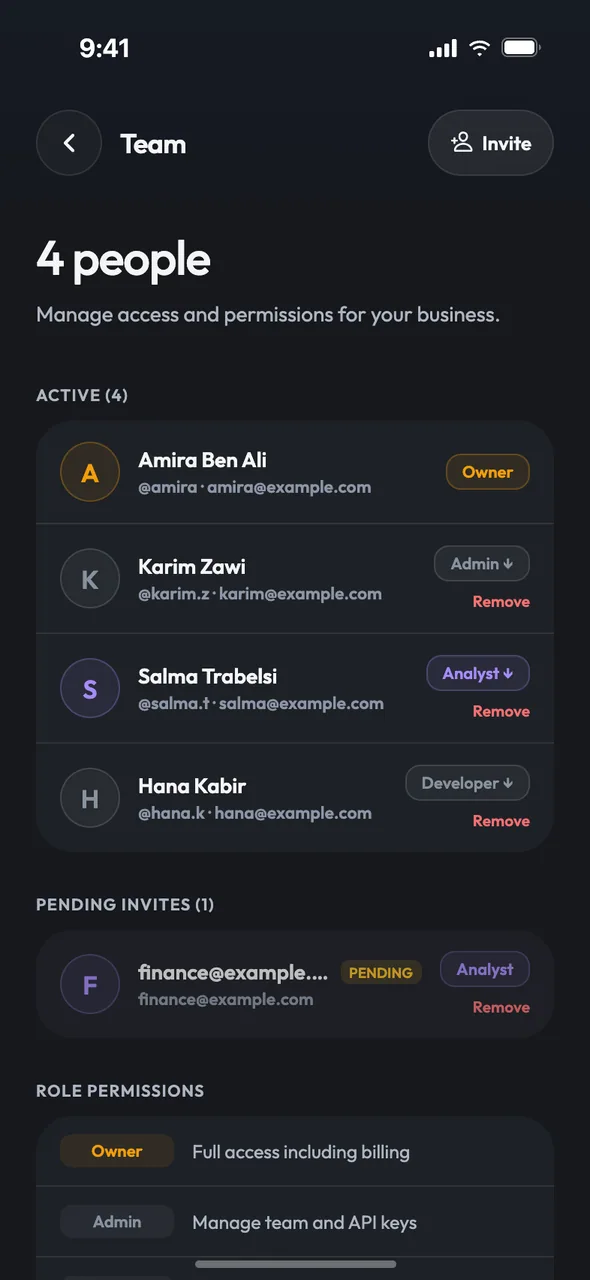
Bring your team, not your password.
Invite people by email. They accept in their own tazdan app and work in the business account with the role you gave them — and nothing more.
Only the owner can grant or remove admin rights. An API key can never do more than the person who created it.
“Payday is me, a list, and forty separate transfers.”
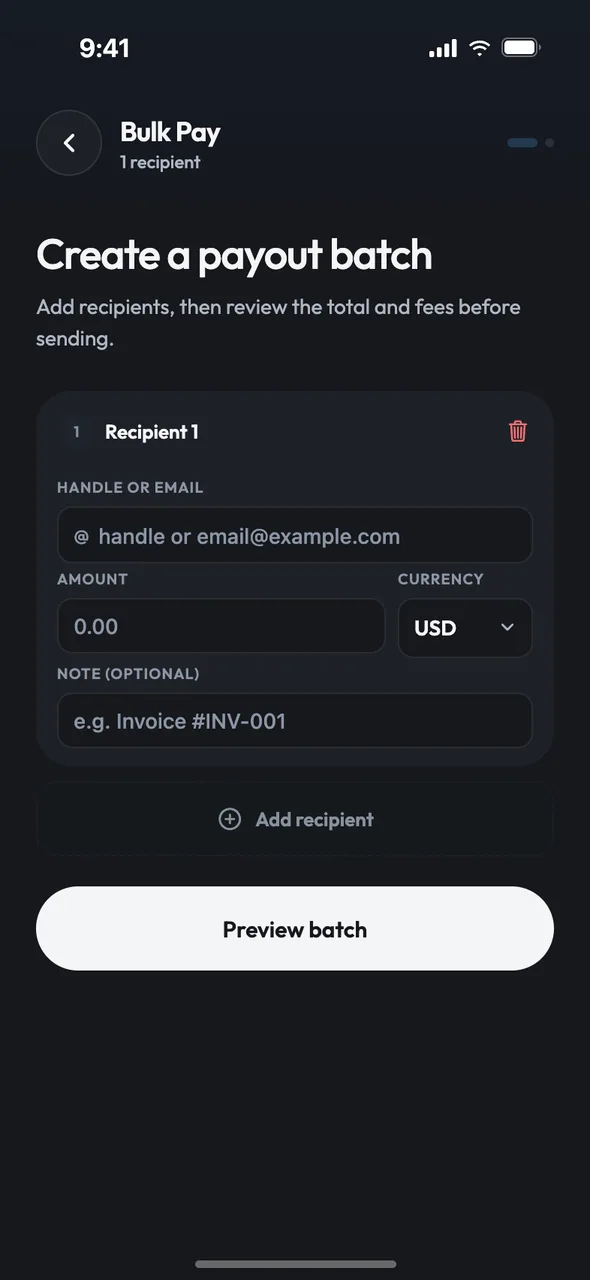
One list, one preview, everyone paid.
Add each person by @handle or email, with an amount and a note. Before anything moves, the preview checks every row and shows the totals, the fees and your available balance.
- Rows that won’t go through are flagged with the reason: no such customer, over the per-payout limit, or the wrong currency.
- The preview shows each person as first name and last initial — enough to know it’s the right person, nothing more.
- The whole batch is reserved from your balance at once, so it either fits or is refused up front.
- Each payment runs on its own. If one fails, it’s rolled back and its money returns to your balance.
“Nobody looked at that transfer until it was already gone.”
A second pair of eyes, built in.
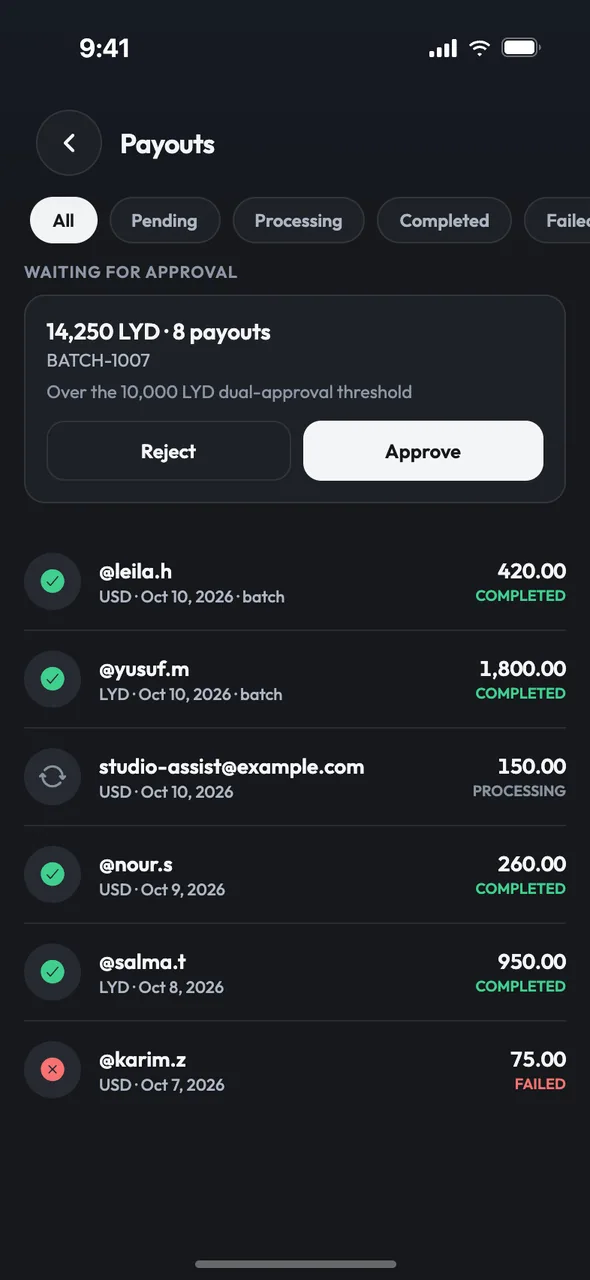
When a batch reaches your approval threshold, it waits. A different owner or admin opens it in the app and approves or rejects it — whoever created the batch can’t sign it off.
- The threshold is 10,000 USD by default; only the owner can change it.
- The only signatory? You confirm the batch with a security code instead.
- Batches sent through the API above the threshold always wait for a person.
- Reject a batch and the reserved money goes straight back. No one is paid.
“Did the supplier get paid? Let me check the notebook.”
Every payout, accounted for.
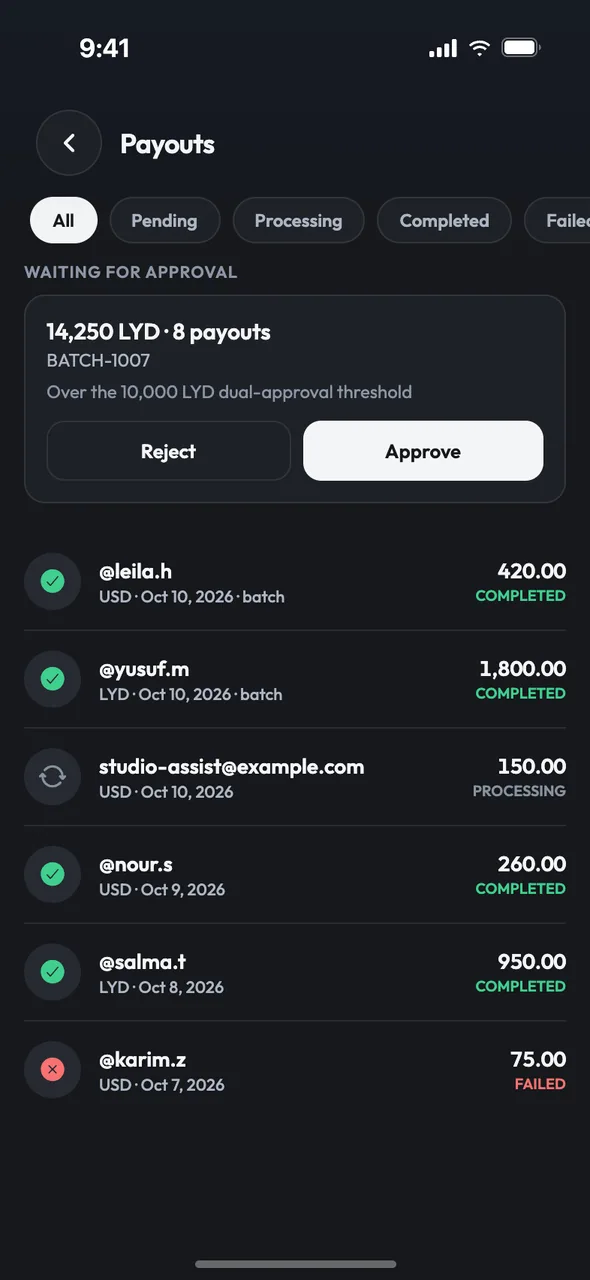
The Payouts screen is your running record of money sent. Filter by pending, processing, completed, failed or cancelled, and open any payout for its reference, recipient, amount, fee, net amount and batch.
- Copy a reference or batch ID straight into your books.
- Cancel a payout that hasn’t started yet, and its money is released at once.
- Batches waiting for your approval sit at the top of the list.
“Our payroll system exports a file. Then someone types it all in again.”
Let your systems do the typing.
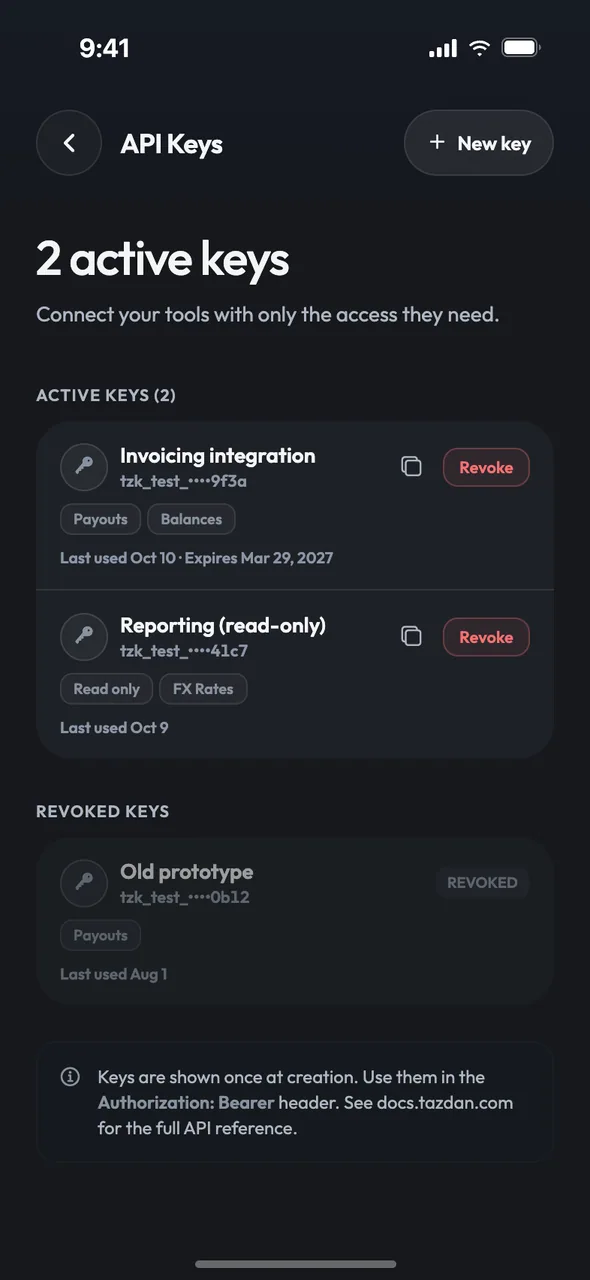
Create API keys in the app with only the permissions they need, and revoke them with a tap. The full key is shown once, when you create it, and tazdan never stores it.
- Permissions: payouts, balances, rates, webhooks — or read-only.
- Keys can expire after 30 days, 90 days or a year, or stay until you revoke them.
- Every key shows when it was last used.
Screens from the current app build. Names and amounts are illustrative.
A payouts API that won’t pay twice.
JSON over HTTPS. Authenticate with a key, send an Idempotency-Key with every write, and check the signature on every webhook.
curl -X POST "$TAZDAN_API_BASE/api/v1/payouts" \
  -H "Authorization: Bearer tzk_test_••••••••••••Qd8w" \
  -H "Idempotency-Key: payroll-2026-10" \
  -H "Content-Type: application/json" \
  -d '{
    "currency": "USD",
    "note": "October payroll",
    "recipients": [
      { "handle": "salma_b", "amount": "850.00", "note": "Salary" },
      { "handle": "omar_k", "amount": "620.00", "note": "Salary" },
      { "email": "accounts@example.com", "amount": "1240.00", "note": "Supplier" }
    ]
  }'
Send the same Idempotency-Key again and you get the original batch back, with 200 and "replayed": true — never a second payment.
$TAZDAN_API_BASE stands for the tazdan API address of your environment. Test keys start with tzk_test_ and only work on test servers.
Balance, reserved and available amounts for every wallet.GET /api/v1/balances
Live buy and sell rates for a currency pair, with the source and time.GET /api/v1/rates?base=USD"e=LYD
One recipient or up to 500 per request, by @handle or email. List, filter and look up payouts and batches by ID or reference.POST /api/v1/payoutsGET /api/v1/payoutsGET /api/v1/payouts/:idGET /api/v1/batches/:id
Register up to 10 HTTPS endpoints and choose the events each one receives. The signing secret is shown once.GET · POST /api/v1/webhooksDELETE /api/v1/webhooks/:id
payout.completedpayout.failedpayout.cancelledbatch.pending_approvalbatch.compliance_reviewbatch.completedbatch.rejectedSend the key as an Authorization: Bearer header or as X-Api-Key. Each key can make 120 requests a minute, and every write needs an Idempotency-Key of at least 8 characters.
Controls that protect a business.
The same rules apply whether a payout starts in the app or over the API.
Two people for big payouts
Maker-checker on every batch at or above your threshold. The maker can’t approve their own batch, and API batches always wait for a person.
Money reserved before it moves
A batch reserves its full amount when it’s submitted. Every paid line posts a balanced ledger entry; failed, rejected or cancelled lines release their money.
Keys that can’t overreach
192-bit random keys, stored only as SHA-256 hashes. Scoped, expiring and revocable — a key acts with its creator’s current role and stops working if they leave the team.
Live keys stay in production
A tzk_live_ key is refused on any non-production server, and a tzk_test_ key on production — so a test script can’t move real money.
Webhooks, signed and fenced
HMAC-SHA256 signatures with a timestamp, HTTPS only, no redirects. Private and internal addresses are refused and re-checked at send time; failed deliveries retry with backoff, up to 8 attempts.
Screened, recorded, never paid twice
Every recipient is screened and every line risk-checked; a flagged line holds the batch for compliance review. Keys, batches, approvals and cancellations all land in the audit trail.
What’s not built yet.
Better you read it here than find out on payday.
Bulk pay sends to tazdan wallets only. To pay a bank account abroad, use send abroad — it’s in pilot, on sandbox rails, until a licensed payout partner is live for each corridor.About send abroad
You can’t yet create or send invoices, or collect payments from your customers. The app’s Payouts screen is a record of the money you send.
In the app you add recipients row by row. To pay from a file, send up to 500 recipients in one request through the API.
API reference pages aren’t published yet. Talk to us and we’ll walk you through the API.Talk to us
Business, answered.
Payday, without the cash run.
Join the waitlist and we’ll let you know as soon as business accounts open.
Pre-launch. Services depend on regulatory approval and partner availability.